9a. Snip what just played: the running buffer, forks and chops
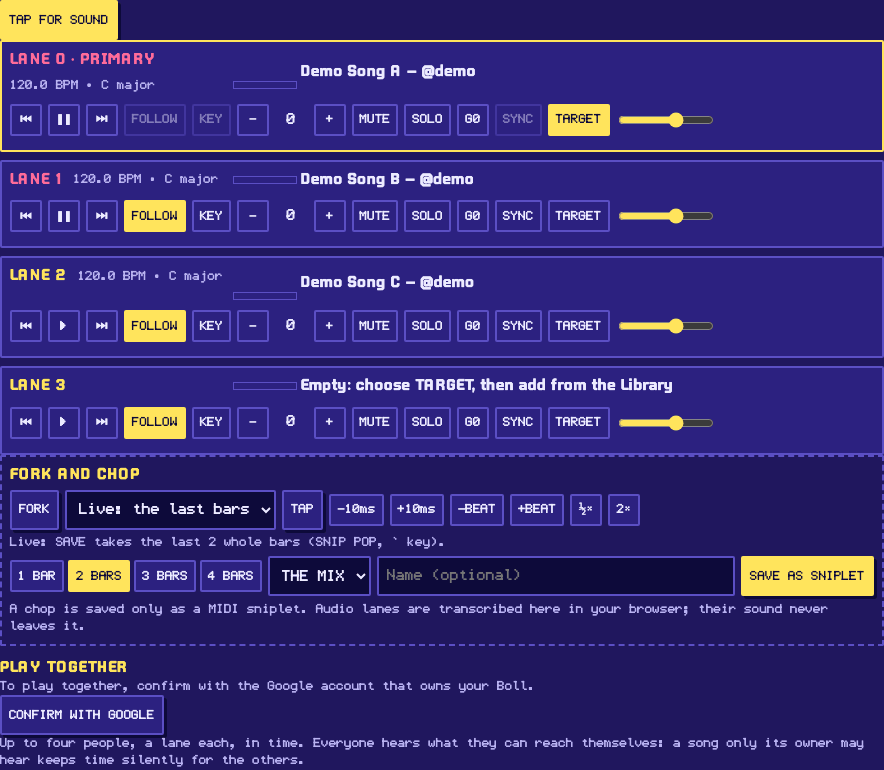
Pompas plays four lanes of music. While they play, it keeps a note of what played. When you hear something you like, you can snip it: freeze the last bars, pick one to four of them, and save them as a sniplet in your crate.
9a.1 The running buffer#
Works now
Pompas always knows what the last three minutes sounded like, so you can snip something after you've heard it.
What it keeps: a list of what each lane was doing, point by point: which song, where in it, how fast, how far transposed, and whether you could hear it. It records what played, never sound, so keeping it costs nothing, on every lane at once.
Good to know:
- It keeps three minutes, and keeps them in memory only: it is not saved, so it starts empty again after Pompas restarts.
- Everything you do to a lane writes to it: changing the speed or key, muting, soloing, and a Sync now when it lands.
See also: 9a.2 · 9a.4
9a.2 Fork the last 16 bars#
Works now
Freeze the last 16 bars so you can pick pieces of them to keep.
| On | Do this |
|---|---|
| Computer | Press FORK on the Lanes view, or press Tab |
What happens: Pompas copies the last 16 bars of the primary lane (lane 0) out of the buffer and keeps them. If the primary has no beat grid, it takes the last 30 seconds. It never takes more than the last 60 seconds. The fork then appears in the Fork list, and its bars are numbered so you can choose where to chop.
Good to know: a fork holds what played, never the sound, and no song titles.
See also: 9a.3 · 9a.4
9a.3 Pompas keeps your last eight forks#
Works now
Fork freely: the newest eight are always there.
What happens: Pompas keeps eight of your forks. When you make a ninth, the oldest goes. A fork you chop from stays until it is pushed out like any other.
Good to know: a live chop (9a.5) freezes the buffer for itself, and that freeze is separate: it never shows in your list and never costs you one of your eight.
9a.4 Save bars as a sniplet#
Works now · the station reworks it
Turn one to four bars of a fork into a sniplet you can keep and play.
| On | Do this |
|---|---|
| Computer | Choose a fork (or "Live: the last bars"). Choose the length: 1 BAR to 4 BARS. Choose which lane: lane 0 to 3, or THE MIX. Click the bar you want it to start on. Give it a name if you like, and press SAVE AS SNIPLET |
What happens: the notes in those bars become one sniplet in your crate. It is a loop, marked AGI ("looping is a good idea"). Pompas works out the rest:
- The role: drums if it is only drums, mix if it has drums and pitched notes, bass if the pitched notes sit low, lead if they are one line, otherwise chords.
- The tempo is the chop's own, and the key is the lane's after any transposition.
- The name is yours (the box takes 60 characters), or Pompas picks one. Names keep no control characters.
- The bars are the primary lane's bars when lane 0 was playing, and the chopped lane's own otherwise.
Good to know:
- A chop with no notes in it is refused: a silent lane makes no sniplet.
- A chop is saved only as MIDI notes. A song's sound never goes into a sniplet.
- Saving the very same notes again does not make a second sniplet: it brings back the one you had.
See also: The crate (9.1) · 9a.5 to 9a.8
9a.5 Snip pop: save the bars you just heard#
Works now
Save the last bars without forking first.
| On | Do this |
|---|---|
| Computer | Press the backtick key. Or, with "Live: the last bars" chosen, press SAVE AS SNIPLET |
What happens: Pompas takes the last whole bars you chose the length of (one to four) from the live buffer, and saves them as in 9a.4.
Good to know: it freezes the buffer for itself first, so the bars stay exactly the bars you heard however long the save takes. That frozen copy is dropped when the save is done.
9a.6 A MIDI lane is sliced exactly#
Works now
Snip a song that is MIDI and get its notes exactly.
What happens: every note that starts in the chosen bars is moved onto the chop's beats, taking account of the lane's speed. The lane's transposition is applied, so you get what you heard. Drums never move: a drum is a drum at any transposition. Notes are cut off at the end of the chop.
Good to know: it works the same whatever speed the lane played at.
9a.7 Chop the mix#
Works now
Snip everything you were hearing at once.
What happens: choose THE MIX and every lane that was audible in those bars goes into the sniplet, one part for each. A lane that was muted, or silenced by a solo, is left out. Drums go in a part of their own.
See also: 9a.4
9a.8 Chop an audio lane#
Works now · the station reworks it
Snip a song that is a recording, and get its notes.
What happens: Pompas cuts those bars out of the recording in your browser and finds the notes there: where each note starts, how high it is, and whether it is a kick, a snare or a hat. It is a quick pass, a sketch of the music.
Good to know:
- The sound never leaves your browser. Only the notes are sent to be saved.
- A lane that is only loosely in sync cannot be chopped this way, and is skipped with a note.
- The page tells you how many bars and notes it saved.
See also: 9a.9
9a.9 Chop a corpus song from its own transcription#
Works now
Snip a recording from a corpus and get notes that were made with more care.
What happens: every recording in a corpus has a MIDI transcription that the corpus build made, lined up with the audio. A chop of a corpus lane takes its notes from there, over the same bars you chose.
Owned by: the corpus's licence. It only happens when the licence lets you export its transcription. Without that, the quick pass of 9a.8 does it, as before.
Good to know: only MIDI is read, so no recording's sound moves anywhere. The sniplet records which transcription it came from.
9a.10 Whose file is it?#
Works now
Snip your own music without leaving a trace of it.
What happens: a sniplet cut from a file of your own names no file. Its song and title are empty, its source says only "a file", and nothing about it is logged.
Good to know: only a sniplet made entirely from band songs or corpus tracks may follow you the way those songs do (9a.11).
9a.11 Snipping a band song or a corpus song#
Works now
Keep where a sniplet came from, when it is a song the band or a corpus made.
What happens: a sniplet cut from a band song or a corpus track keeps its source by the song's id. That is what lets it follow you the way the song does.
See also: 9a.10