15. Nesting: loops in loops, beats in beats
A sniplet can hold other sniplets. A beat holds its kick-and-hat bar, looped four times, and a fill near the end; a loop holds a shorter loop. A sniplet that holds others is a sniphrase. What it holds are its children, each placed at a row and a column, playing for as long as you give it: longer than itself and it loops, shorter and it is cut.
A child is the same sniplet wherever it plays. Change its notes once and every place it plays changes. When you want one place to differ, Snipfork it: that place gets a copy of its own, and the others keep the original.
15.1 Put a sniplet inside another#
Works now
Build a beat out of beats: put the sniplet in your hand inside the one you've selected.
| On | Do this |
|---|---|
| iPad / touch | Take a sniplet in hand (11.6), select the sniplet to put it in, put the cursor on the row, then Nest on the bar |
| Computer | The same, then Alt+J |
What happens: the one in hand goes inside the selected sniplet at the cursor's row, on its first column, with the hand's own length and transpose. The selected sniplet opens in place (15.2) so you can see it there. With a child open, it goes into the one on show, at the cursor's row inside it.
Good to know: it has to fit. It can't run past the sniplet's rows or columns, can't share a place with another child, and a sniplet can't hold itself, even through others. When it doesn't fit, a message says why and nothing changes. See 15.8 for the limits.
See also: 15.2, 11.6.
15.2 Open a sniplet that holds others#
Works now
See inside a sniphrase without leaving the song: it opens in place while the song keeps playing.
| On | Do this |
|---|---|
| iPad / touch | Select it and tap Open on the bar, or tap it twice. Inside, tap a child to go into it |
| Computer | Select it and press Alt+Enter |
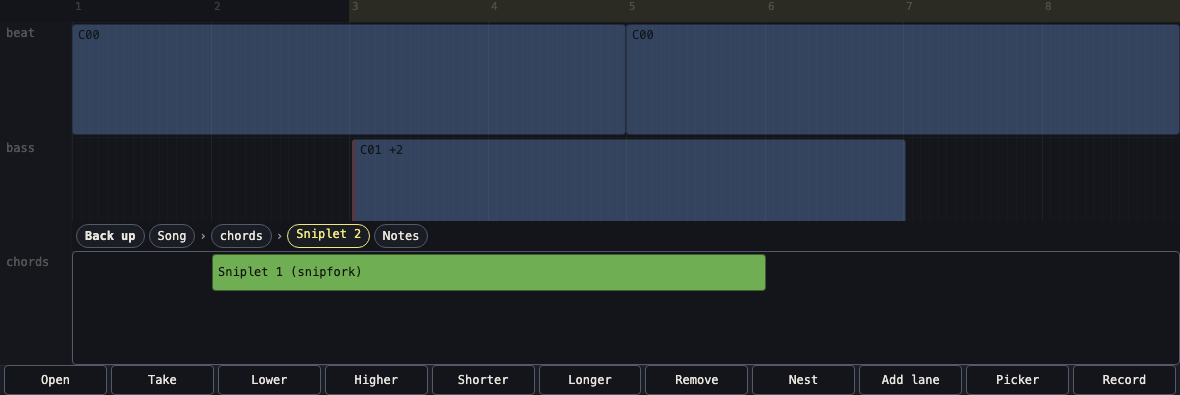
What happens: the sniplet is drawn over its lane, its children as blocks inside it (a child that loops says how many times, ×4). The other lanes dim. A breadcrumb above it says where you are, Song › lane › Beat A › Fill, and the playhead runs inside it at the place the song is playing, looping as the child loops.
Good to know: a sniplet that holds no others opens its notes, as before (11.12).
See also: 15.3, 15.4.
15.3 Go back up#
Works now
Step out of a child to the sniplet that holds it, and out of the last one to the song.
| On | Do this |
|---|---|
| iPad / touch | Back up on the breadcrumb, or tap a name on it to go straight there |
| Computer | Alt+Backspace |
15.4 Edit a child's notes#
Works now
Change a child once, and every place it plays changes.
| On | Do this |
|---|---|
| iPad / touch | Inside the child, Notes on the breadcrumb. Or, in the note view, the step grid or Roll, edit where the child plays |
| Computer | Alt+Shift+Enter for its notes |
What happens: in the note view and the step grid, a child's rows are tinted, its name where it starts; Roll shows each child as a band. Editing there opens the child at that place, says so, and writes nothing into the sniplet that holds it: the notes are the child's. When the place lies in a child of the child, that one opens, in one press.
Good to know: a note of the sniplet's own at a child's place stays its own, and plays over the child there. Put a row in, or take one out, and the children move with it: one the row runs through grows or shrinks by a row, and a one-row child on a row taken out goes (it says so). A column can't go in or out through a child: the ones beside it move over. While the song plays, a change inside a nest is heard at once, in every place the child plays. A change too big to hear at once (a short loop used in many places, a lot of it changed) plays from the next start, and says so.
15.5 Make one place different: Snipfork this one#
Works now
Give one place its own copy of a child, and leave the others as they are.
| On | Do this |
|---|---|
| iPad / touch | Open the child where it plays (15.2): when it plays in more than one place, the layer says "Used in 3 places. Edits change all of them." Tap Snipfork this one |
What happens: that place now plays a copy, named "Fill (snipfork)" ("Fill (snipfork 2)" for the next one), with the same notes, key and sound. Every other place still plays the original. Undo takes the copy away and puts the original back in that place.
Good to know: a child that is one step of a chain offers no Snipfork this one.
See also: 15.6, and Keyfork (13.5).
15.6 Forks of a sniplet, in the picker#
Works now
Find every copy you made of a sniplet in one place.
| On | Do this |
|---|---|
| iPad / touch | Open the picker (section 13): under Everything, each sniplet with forks has a row, "Forks of Fill" |
| Computer | The same, with Alt+O |
What happens: its chain column lists the original first, then each fork and how it was made: snipfork, or keyfork with its key.
15.7 How a child plays#
Works now
A child plays exactly as it would on a lane of its own, inside its sniplet.
What happens: a child starts at its row and plays for its length, starting again from its first row each time its own rows run out. Its transpose moves its notes; a note it takes out of range is left out. Where the sniplet has a note of its own at a child's place, the sniplet's own note plays. A child with no instrument of its own plays the one of the column it lands on. A condition like 1:2 counts the child's own starts, so a one-bar loop with 1:2 alternates bar by bar inside a four-bar beat. Every tracker that opens your song plays it the same way, because the export lays every child out in full.
15.8 How far a nest goes#
Works now
The limits, and what you see at them.
Good to know: a sniplet holds at most 256 children. Nests go 4 deep: a sniplet, a child, its child and one more. A song laid out in full holds at most 49,152 notes and 196,608 locks: a short child looped in many places counts once for every place it plays. Past any of these, the change is refused with the reason, and nothing changes.
15.9 Snip + Key#
Works now
A copy of a sniplet that holds others, and of every sniplet in it, moved to another key in one step.
| On | Do this |
|---|---|
| iPad / touch | Select the sniplet, open the switcher (⇆) and tap Keyfork: for a sniplet that holds others it says Snip + Key. Pick the note and Major or Minor, then Make the copies |
| Computer | The same from the switcher |
What happens: the sniplet and each sniplet inside it are copied once, all moved by the one key change, so every child keeps its place and its transpose. A child used twice inside is one copy used twice. Kits' notes never move. Each copy is named like "Beat A (snipfork, A minor)", the new one goes into your hand, and the originals are as they were. One undo takes every copy away.
Good to know: the key is heard from everything the sniplet plays, children too, unless one is set. A sniplet that holds no others is moved by Keyfork as before (11.12).
15.10 Keep a sniplet in the crate#
Works now
Keep a sniplet, and every sniplet in it, in this device's crate, to use again later.
| On | Do this |
|---|---|
| iPad / touch | Open the picker (section 13), move to the sniplet, and tap Save to crate |
| Computer | The same, in the picker |
What happens: the sniplet is kept by what it plays, so saving the same notes twice keeps them once. Each sniplet inside it is kept too, once however often it is used. A message says how many were kept, or that they were there already. The crate remembers which song each came from.
To use one again: in the picker, the song column ends with Crate. Move to it, then to the sniplet, and tap Take in hand: it comes into the song with every sniplet in it, and into your hand to place. A sniplet the song already has is used as it is, not copied again. The song notes which songs they came from (by the song, never by person), so a credit travels with it. One undo takes it all away.
Good to know: the crate is in your locker as well as on this device, so your other devices and the web see it too. When the locker can't be reached it stays on this device, and the message says so. A chain can't go in the crate on its own: save the sniplet that uses it.