19. Choosing, hiding and finding ways to work
A way to work is a screen and a way of making music on it: the Sniplane, the step grid (section 16), tape (section 17), the band's way (section 18), the mixer, and the others as they arrive. Every way works on the same song, so switching never converts anything. You choose which ways you see. The rest stay out of your way until you ask for them.
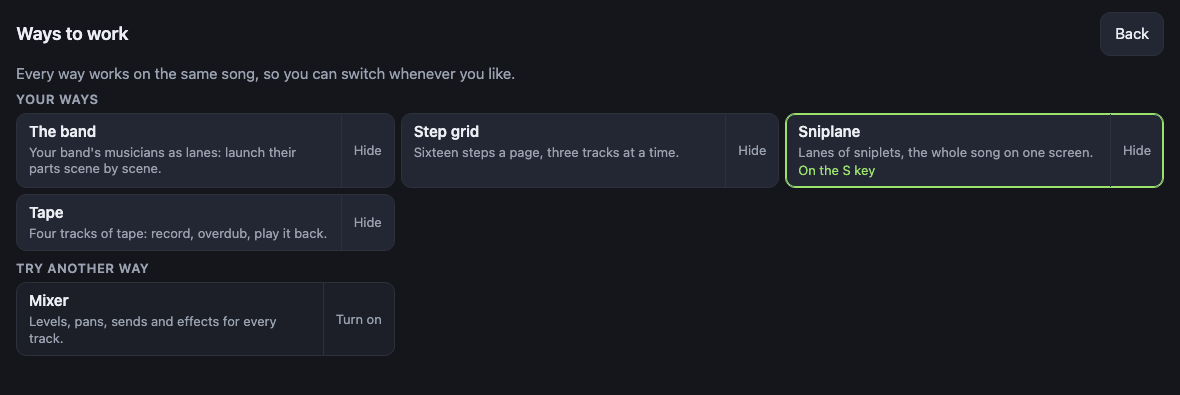
The Ways screen lists them all. The ways that are on are under Your ways. The ones you hid are under Try another way.
19.1 Open the Ways screen#
Coming in 0.4.2
See every way to work in one place, from wherever you are.
| On | Do this |
|---|---|
| Pop Snipler | Hold your mode key and tap key 46 |
| iPad / touch | Tap ⇆ in the top bar, then Ways to work |
| Computer | Option/Alt+Shift+W, or click ⇆ in the top bar, then Ways to work |
What happens: the screen lists each way with a line about what it is for. The way your S key shows is marked "On the S key".
Good to know: to leave without changing anything, tap Back, press key 47, or press Option/Alt+B. You go back to where you were.
19.2 Go to a way to work#
Coming in 0.4.2
Pick the way you want to work in now.
| On | Do this |
|---|---|
| Pop Snipler | On the Ways screen, tap the way's key on the top row (keys 0 to 11, in the order the screen lists them) |
| iPad / touch | Tap the way's card |
| Computer | Click the way's card, or press its number on the number row |
What happens: you go straight to that way. From then on your S key shows the way you picked, in this song and the next, until you pick another. The other mode keys don't change: the mixer stays on A, and picking it takes you to A.
Good to know:
- The Sniplane is what the S key shows until you pick something else. Pick it again to get it back.
- Picking a hidden way turns it on.
- Your choice is kept in this browser.
19.3 Hide a way, or turn one on#
Coming in 0.4.2
Keep the ways you use in front of you, and put the others away.
| On | Do this |
|---|---|
| Pop Snipler | On the Ways screen, tap the key under the way's key (keys 12 to 23) |
| iPad / touch | Tap Hide on the way's card, or Turn on on a hidden one |
| Computer | Click Hide or Turn on, or press the key under the way's number (Tab, Q, W and so on) |
What happens: a way you hide moves under Try another way. Turn it on and it moves back under Your ways. Nothing in your song changes either way.
Good to know:
- One way always stays on. Hide the last one and the station says: "One way to work stays on."
- If you hide the way your S key shows, the S key shows the next way that is on. When none of the ways that are on uses the S key, it goes on showing the Sniplane, and the Ways screen still marks it "On the S key".
- Every way starts on. When you're stuck, look under Try another way.
See also: 19.2 · section 46.8 for every key
19.4 Go anywhere: the quick switcher#
Coming in 0.4.2
Get to any mode, any alt mode, any way to work, Ways or Export, in one move.
| On | Do this |
|---|---|
| Pop Snipler | Tap ⇆ in the top bar, then tap a place. Or press ⇆, slide your finger to a place and let go. Or hold your mode key and press key 45 |
| iPad / touch | Tap ⇆, then a place; or press, slide and let go |
| Computer | Option/Alt+Shift+Space, or click ⇆. Then click a place, or press its key: the number row and the row under it, in the sheet's order |
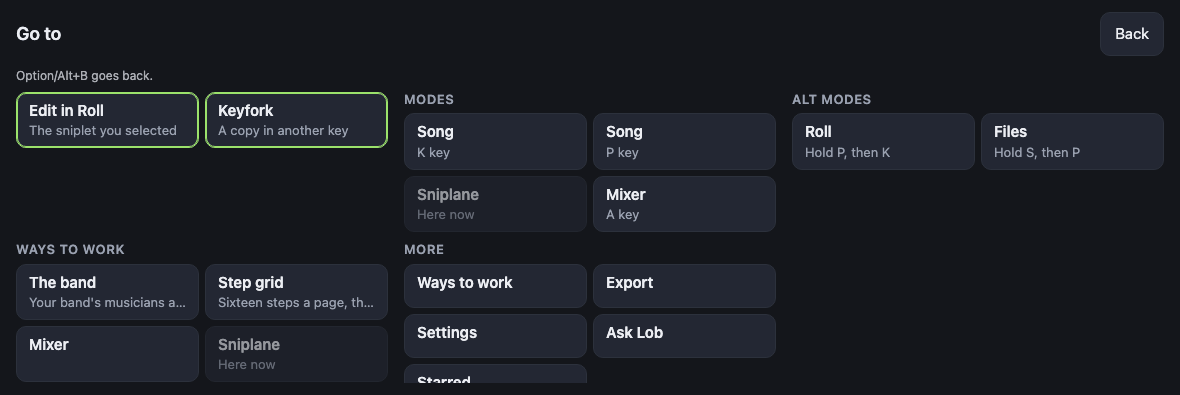
What happens: a sheet of every place you can go opens over the screen, in this order:
| Group | What's in it |
|---|---|
| Edit in Roll | First, when you've selected a sniplet (on the Sniplane, in the crate, a track): Roll opens on it |
| Recent | The last places you went from the sheet, newest first, up to three |
| Modes | K, P, S and A, each with the screen picking it takes you to. The one on your screen says "Here now". With Export or Ways open over a mode, that mode shows its own screen, and Export or Ways says "Here now" |
| Alt modes | Each mode's alt modes, such as Roll under P, with how to reach it from the keys: "Hold P, then K" |
| Ways to work | The ways that are on. Picking one makes your S key show it (19.2) |
| More | Ways to work (19.1) and Export (section 36) |
Picking a place goes there and closes the sheet. Back, key 47 or Option/Alt+B closes it without going anywhere, and so does Escape while a place on the sheet has the focus.
Good to know:
- ⇆ took the place of the separate Ways and Export buttons, so the top bar stays short on a small screen.
- Tap ⇆ again while the sheet is open to close it.
- When you slide, the place under your finger lights up before you let go.
- With a keyboard or a screen reader: press
Enteron ⇆ and the sheet opens with the focus on its first place.Tabmoves through the sheet and stays in it; when it closes, the focus is back on ⇆. - On Windows (and some Linux desktops),
Alt+Spaceopens the window's own menu, andAlt+Shift+Spacemay do the same. This hasn't been tried on Windows yet. If it happens, click ⇆ or hold your mode key and press key 45.