36. Exporting
Exporting makes a file of your song that leaves the station: for another tracker, for a music program, or for safekeeping. Your song itself stays where it is.
The Export screen lists six kinds, each with its format beside it: For any tracker (.it + .xmlx), Pop Snip file (.pxs), Tracker module (.it), MIDI file (.mid), Audio stems (WAV) and Tracker project (.mt). The first is the one you get unless you pick another.
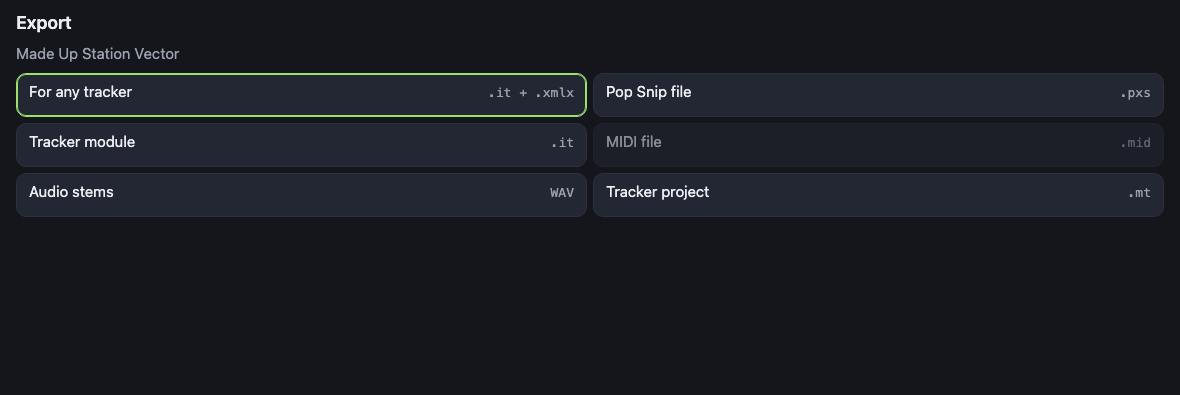
36.1 The Export screen#
Coming in 0.4.2
Pick what kind of file to make of your song, and watch it being made.
| On | Do this |
|---|---|
| Pop Snipler | Hold your mode key and tap key 47 to open it. Keys 0 to 5 make that kind at once; keys 36 and 37 move the choice, and key 38 makes the chosen kind |
| iPad / touch | Tap ⇆ in the top bar, then Export, then tap a kind |
| Computer | Option/Alt+Shift+E to open it, ↑ and ↓ to choose, Enter to make it |
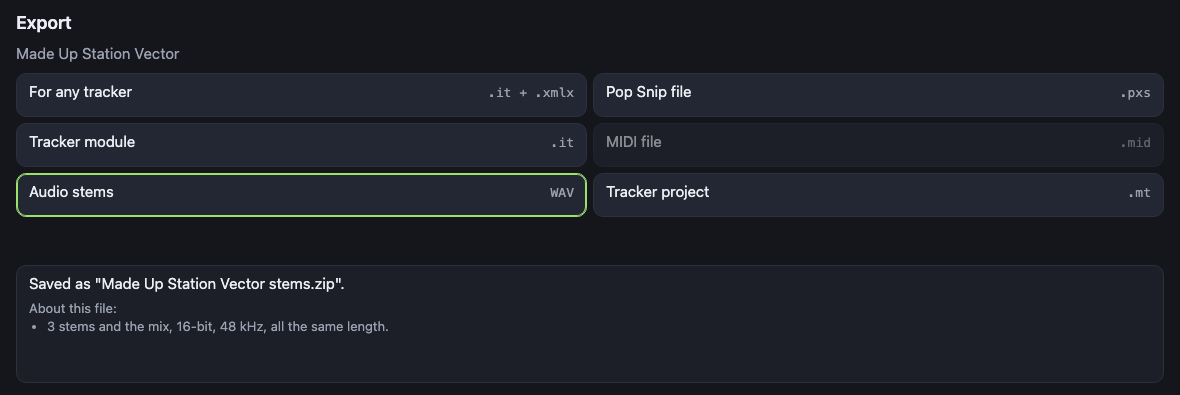
What happens: the screen says "Making it…" and the kind you picked lights up. When the file is ready your browser saves it, and the screen says what it was saved as, for example: "Saved as "My Song.pxs"." Under "About this file:" the station lists what to know about it: how many stems there are, or what of your song didn't fit the kind you picked.
Good to know:
- One export is made at a time. While one is being made the other kinds wait; press a kind's key meanwhile and the station says: "One export at a time."
- To stop one, tap Cancel, press key 39, or press
Backspace. Nothing is saved, and the screen says: "Export cancelled." - Audio stems take the longest, and the screen counts them as they are made: "Stem 2 of 4".
- A kind your song or your device can't make right now is dimmed. Press it and the station says why.
- In this release MIDI file is always dimmed: a song made on the station doesn't carry its MIDI yet.
- If you have changed the sound of a built-in synth, the station records that sound again as it makes the file, so other trackers play what you hear. The lines under "About this file:" say what a tracker won't keep of it.
- With no song loaded the screen says: "No song is loaded."
- To go back to where you were: key 47, or
Option/Alt+B.
See also: 46.7 (every key on this screen) · 20.6
36.2 For any tracker (.it + .xmlx)#
Coming in 0.4.2
Take your song to any tracker and keep every Pop Snip detail beside it. This is the export you get unless you pick another.
What you get: one zip with two files:
<title>.it, a classic Impulse Tracker module that OpenMPT, Schism Tracker and any player that reads.itopen;<title>.it.xmlx, a small file that carries everything the.itcan't hold (your lanes, synths, sample sources, automation, licences and how the song was made), tied to that exact.it.
Good to know:
- Your samples never leave your device. Only the song's details (at most 256 KB, no audio) go to Pop Boll to make the
.xmlx, and nothing is kept there. - Offline, you get the
.italone, and the station says: "You're offline, so this is the .it on its own. Export again when you're connected to get its .xmlx too." - If your song's text holds something that must not leave your device (an email address, say), you get the
.italone, and the station names where it is: the title, track or phrase names, the lyrics, or the song's details. Change it and export again. - A very large song can hold more detail than an
.xmlxhas room for. Then you get the.italone, and the station says so. The.pxsalways holds everything.
See also: 36.3 · 36.4 · 37.5
36.3 Pop Snip file (.pxs)#
Coming in 0.4.2
Keep your song in one file that has everything: a module any tracker plays, with every Pop Snip detail inside it.
Good to know: a .pxs opens in the station exactly as you left it. Trackers play it as a plain module.
36.4 Tracker module (.it)#
Coming in 0.4.2
A plain .it module for any tracker, with nothing beside it.
Good to know: a tracker that re-saves it keeps the music; the Pop Snip details are not in this file.
36.5 MIDI file (.mid)#
Planned · the row is on the Export screen, dimmed
Take your song's notes into any music program as one MIDI file.
In this release: a song made on the station doesn't carry its MIDI yet, so MIDI file is dimmed on the Export screen. Press it and the station says: "This song's save doesn't keep its MIDI yet, so there's no .mid. Try WAV stems."
What you get, when it arrives: <title>.mid, with one track for each of your tracks, named as you named them, and the song's tempo.
Good to know:
- It plays what your song plays the first time through, with fills off.
- Each instrument in a track gets its own MIDI channel; drum kits share channel 10.
- A very long song is saved without its MIDI. Then this export isn't offered, and the station says: "This song is too long to keep its MIDI in the save, so there's no .mid. Try WAV stems."
See also: 36.2 · 36.6 · 37.1
36.6 Audio stems (WAV)#
Coming in 0.4.2
Take your song into a music program as audio, one file for each track, ready to mix.
What you get: one zip with <title> - mix.wav (the whole song) and a stems folder with one WAV for each track, numbered in track order and named as you named the tracks.
Good to know:
- Every file starts at the very start of the song and ends on the same moment, with 4 seconds for the last notes to ring. Drop them all in at bar 1 and they line up, and together they sound like the mix.
- One place they can differ: where the song is loud enough for its limiter to hold the mix down. Each stem is limited by itself, so there the stems together can be a little louder than the mix.
- The station makes them on your device. Nothing is uploaded, and it works offline.
- The files are 16-bit, 48 kHz stereo. A 3-minute track is about 35 MB.
- While they are made the Export screen counts them: "Stem 2 of 4". Cancel stops it, and nothing is saved.
- When they're done, the station says how many, for example: "3 stems and the mix, 16-bit, 48 kHz, all the same length."
See also: 36.1 · 37.1
36.7 Tracker project (.mt)#
Coming in 0.4.2
Carry your song into a .mt project, to keep working on it in a tracker that opens one.
What you get: one zip with a folder named after your song: project.mt, a patterns folder and an instruments folder. Copy the folder to where your tracker keeps its projects.
What fits, and what doesn't (the station tells you each time what was left out):
- A
.mtproject has 8 tracks, one note at a time on each. Your first 8 channels that play notes go across. - Each instrument in a
.mtproject has one sample, so an instrument made of several becomes several: a kit of five drums is five instruments. A project holds 48, so a song with more keeps the 48 it plays most. - A step in a
.mtproject is a sixteenth note, so your song needs 4 rows to a beat. A pattern longer than 128 rows is split into pieces of 128. - Volume, panning, a late note, a tempo change and a pattern break go across. Other effects don't.
- A song whose samples are very large can't be made into a project.
Good to know:
- The station makes it on your device. Nothing is uploaded, and it works offline.
- The files are written by tracker-lib, the open-source library for the
.mtproject format (MIT licence): https://github.com/polyend/tracker-lib - Your
.pxskeeps everything, so you can always come back to it.